My PC Uploaded 196 GB to "Netflix". I Don't Have Netflix.
How a runaway speed test quietly uploaded 196 GB from my Linux desktop, how I tracked it down with per-process network monitoring, and the 4-line fix I sent upstream to Omarchy.

One morning I noticed something off with my home network, so I asked a simple question: is anything on this machine uploading or downloading a lot right now?
The live answer was boring: a few KB/s, mostly Claude Code, Spotify, Slack and my browser idling. But the interface counters told a different story:
$ awk '/enp0s31f6/{printf "down %.2f GB  up %.2f GB\n",$2/2^30,$10/2^30}' /proc/net/dev
down 148.27 GB  up 195.97 GB

$ uptime -p
up 2 days, 18 hours, 34 minutes
196 GB uploaded in under three days. On a desktop that mostly runs an editor, a browser and a terminal.
My router's traffic analyzer had an answer too: the traffic was "Netflix". There's just one problem: we don't have Netflix.
Part 1: Hunting a process that no longer exists
The frustrating thing about Linux is that it doesn't keep per-process network history. /proc/net/dev tells you how much went through the interface, and ss -tupn tells you who's connected right now, but nothing tells you who sent 196 GB yesterday.
So I started eliminating suspects (with Claude Code doing most of the legwork):
- Per-process I/O counters (
/proc/<pid>/io): the biggest live writers were my status bar (polling/proc, not network), a Codex daemon and the browser, adding up to maybe 15–20 GB, and that number includes disk and pipe I/O too. - Tailscale: not an exit node, no advertised routes, about 2 MB total on
tailscale0. - Docker, VMs, sync tools, torrents: nothing running.
- Shell history: no
rsync,scp,rclone,docker push, cloud CLIs. - Large new files: none since boot.
- Unknown processes, cron jobs, autostart entries: nothing suspicious.
- Current connections: Anthropic, Google, GitHub, Cloudflare, Microsoft, AWS (Slack). No Netflix anywhere.
At 196 GB over ~2.75 days, the average was about 6.6 Mbit/s of continuous upload. That's not "someone uploaded a big file once". It looks more like a stream or a loop.
I also assumed the router's "Netflix" label was a misclassification. Consumer routers guess app names from IP ranges, and Netflix runs on AWS and big CDNs. Upload traffic labelled as a streaming service felt like a classic false positive.
That assumption turned out to be wrong, but I didn't know that yet.
Part 2: Install monitoring so it can't hide again
Since I couldn't reconstruct the past, I set up tools to catch the next occurrence:
| Tool | What it gives you |
|---|---|
| picosnitch | A BPF daemon that logs bytes sent/received per executable and per remote host into SQLite. This is the important one. |
| vnstat | Hourly/daily totals per interface, to see when a spike happened |
| nethogs | Live per-process bandwidth view |
On Arch / Omarchy:
sudo pacman -S --needed nethogs vnstat
yay -S picosnitch            # review the PKGBUILD first
sudo systemctl enable --now vnstat picosnitch
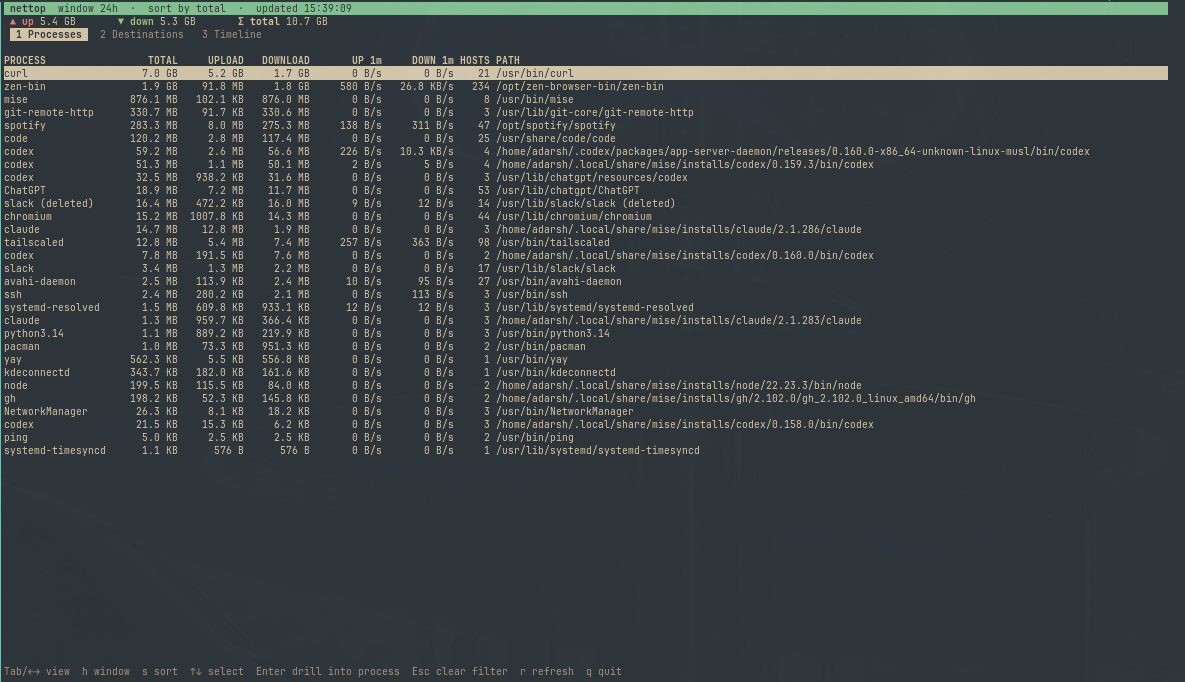
picosnitch's database lives at /var/lib/picosnitch/picosnitch.db and is world-readable, so I wrapped it in a small Python curses TUI, nettop-report, with three views:
- Processes: total / upload / download per program, plus the last-minute rate
- Destinations: which process talked to which host, and how much
- Timeline: upload/download bars per time bucket, to spot when a spike happened
Two details worth knowing if you query picosnitch yourself:
- Group by
executables.exe, notname.nameis often a thread name likeSocket Threadortokio-rt-worker. - Domains are stored reversed (
com.anthropic.api), so flip them back for display.
Part 3: Caught in the act
A few hours later I glanced at running processes and saw this:
curl -fsS -o /dev/null -X POST --data-binary @- \
  https://ipv4-c029-maa001-ix.1.oca.nflxvideo.net/speedtest?...
Five of them. oca.nflxvideo.net is Netflix's Open Connect CDN, which is also what powers fast.com, Netflix's speed test. So the router was right after all: this really was Netflix traffic, just not Netflix the streaming service.
The parent process:
PID      PPID  COMMAND
1113135  898   /bin/bash /usr/share/omarchy/bin/omarchy-network-speedtest up
And PID 898 was systemd --user. These were orphans: their parent script was gone, and they'd been re-parented to the user's systemd instance.
picosnitch put a number on it. In just over three minutes, these orphans had uploaded:
5.25 GB (~240 Mbit/s)
At that rate, my mysterious 196 GB is only about two hours of the same thing.
I killed them, and upload dropped straight back to ~2 KB/s.
Part 4: Why the speed test never stopped
Omarchy (the Arch + Hyprland setup I run) ships a Network Speed Test in its menu. The panel runs omarchy-network-speedtest down for five seconds, then omarchy-network-speedtest up for five seconds, stopping each phase when time is up.
The upload phase looks roughly like this:
trap cleanup EXIT     # cleanup() kills the workers

traffic_worker() {
  while true; do
    dd if=/dev/zero bs=1M count=64 | curl -X POST --data-binary @- "$url" || return
  done
}

for (( i = 0; i < 8; i++ )); do
  traffic_worker $fast_urls &
done
Eight background workers, each POSTing 64 MB of zeros in an infinite loop. The only thing that ever stops them is the cleanup function, run by the EXIT trap.
I reproduced it fully offline, using the real script with a fake curl on PATH that returns made-up endpoints and just sleeps instead of transferring anything:
| How the script is stopped | Workers left behind |
|---|---|
SIGTERM (graceful) |
0: the trap runs, cleanup works |
SIGKILL (hard kill) |
8: re-parented to systemd --user, looping forever |
SIGKILL can't be trapped, so cleanup never runs. Any path that kills the script hard, or interrupts it partway through cleanup, leaves the workers with nothing to stop them. (In my live case 5 of 8 survived, which suggests cleanup was interrupted midway.)
Each orphan then uploads 64 MB, starts the next 64 MB, and so on, until you log out.
Part 5: The fix: let the workers notice
The workers can't rely on someone else to stop them, so they should check for themselves. In a bash background subshell, $$ still refers to the parent script's PID, so a worker can test whether its parent is alive before starting each transfer:
+# Workers stop once this script is gone, so a hard kill (SIGKILL) that skips the
+# EXIT trap can't leave them uploading/downloading forever as orphans.
+parent_pid=$$
+
 traffic_worker() {
   ...
-    while true; do
+    while kill -0 "$parent_pid" 2>/dev/null; do
       ...
kill -0 sends no signal at all. It just checks that the process exists. Now, if the script dies however it dies, each worker finishes its current transfer and exits. The normal SIGTERM path is unchanged.
Same offline test, with the fix:
| Script | Workers left 6s after SIGKILL |
|---|---|
| original, upload | 8 |
| fixed, upload | 0 |
| original, download | 8 |
| fixed, download | 0 |
Part 6: Sending it upstream
The upstream script was byte-for-byte identical to mine, and there were no existing issues about it, so I sent a fix:
- Issue: omacom/omarchy#14025, with the symptoms, cause and offline reproduction steps.
- Pull request: omacom/omarchy#14026, with the 4-line fix plus a regression test in
test/shell.d/network-speedtest-test.sh. The test runs the real script with stubbedipandcurl,SIGKILLs it, and asserts the workers exit. It fails without the fix and passes with it.
The repo's automated reviewer (Greptile) flagged a fair point: my test found workers by matching the command line, so it could have counted or killed a speed test it didn't start. Since each test run is launched with setsid, the script and all its workers share a session whose ID is the script's PID, so I switched the test to pgrep -s <pid>. I verified that with a decoy speed test running alongside it: the decoy's processes were untouched before and after.
(At the time of writing, the PR is open and waiting on maintainer review.)
What I took away from this
- Interface counters tell you something is wrong; they can't tell you who. If you care about where your bandwidth goes, install per-process logging before you need it. picosnitch is lightweight and answers the question you'll actually ask: which program, how much, to where, and when.
- Your router's app labels might be right in a way you didn't expect. "Netflix" wasn't a misclassification. It was the fast.com speed test infrastructure.
- Background workers should never depend only on an
EXITtrap. Traps don't run onSIGKILL. If a child can outlive its parent, make it check that the parent is still there. - Reproduce offline before you touch anything. A stub
curlonPATHlet me run the real script, kill it every way I wanted, and prove the fix without sending a single byte over the network.
If you run Omarchy and have used the Network Speed Test, it's worth a quick check:
pgrep -af nflxvideo
If that prints anything when no speed test is open, you have the same runaway workers.